The allure of Dolby Atmos is undeniable. It promises to transform your living room into a breathtaking cinematic soundstage, with audio cues not just coming from left, right, and center, but from above, creating an immersive, three-dimensional audio experience. Polk Audio, a stalwart in the home audio industry, offers a range of Dolby Atmos-enabled speakers designed to deliver this incredible fidelity. However, simply acquiring these speakers is only the first step. Achieving truly optimal performance requires careful consideration of placement, calibration, and integration with your existing home theater system.
This comprehensive guide will equip you with the knowledge and practical tips needed to unlock the full potential of your Polk Atmos speakers, ensuring every explosion, whisper, and soaring score resonates with unparalleled clarity and impact.
Understanding the Pillars of Polk Atmos Immersion
Before we dive into the nitty-gritty of placement, it’s crucial to grasp the fundamental concepts behind Dolby Atmos and how Polk’s innovative designs contribute to its efficacy. Dolby Atmos relies on two primary types of speaker configurations:
- Traditional Surround Sound Channels: These are your standard front left/right, center, surround left/right, and possibly rear surround speakers, providing the foundational audio landscape.
- Overhead or Up-Firing “Height” Channels: This is the magic ingredient of Atmos. These speakers are responsible for rendering the overhead audio effects. Polk offers two primary approaches to achieve this:
- Dedicated In-Ceiling/On-Ceiling Speakers: These are installed directly into your ceiling or mounted above your listening area, offering the most direct and accurate representation of overhead sound.
- Up-Firing Modules: These are designed to sit atop your existing front or rear tower/bookshelf speakers. They bounce sound waves off your ceiling, reflecting them down to the listener. While a more accessible solution, their effectiveness can be influenced by ceiling height and material.
Polk’s Atmos-enabled speakers, such as their flagship Signature Elite series or the more budget-friendly XT series, often integrate these height channels in clever ways. Some towers have dedicated upward-firing modules built into their top baffles, while others offer separate modules that can be easily added. Understanding which type of Polk Atmos speaker you have will dictate some of your placement decisions.
The Foundation: Strategic Speaker Placement for Polk Atmos

Optimal speaker placement is arguably the most critical factor in achieving a convincing Dolby Atmos experience. This isn’t just about aesthetics; it’s about physics and psychoacoustics – how sound travels and how our brains perceive it.
1. The Center Channel: The Unsung Hero of Dialogue Clarity

While Atmos focuses on height, a well-placed center channel remains paramount for intelligible dialogue. This speaker anchors the spoken word, ensuring you don’t miss a single word of crucial exposition.
- Ideal Placement: Directly above or below your display, as close to ear level as possible. Ensure it’s unobstructed by any objects.
- Why it Matters: Misplaced center channels can lead to dialogue sounding distant or muffled, detracting from the overall immersion.
- Polk Specifics: Polk’s center channel speakers are engineered for clear vocal reproduction. Ensure you select a model that complements your front left and right speakers in terms of sonic signature.
2. Front Left and Right Speakers: The Soundstage Pillars
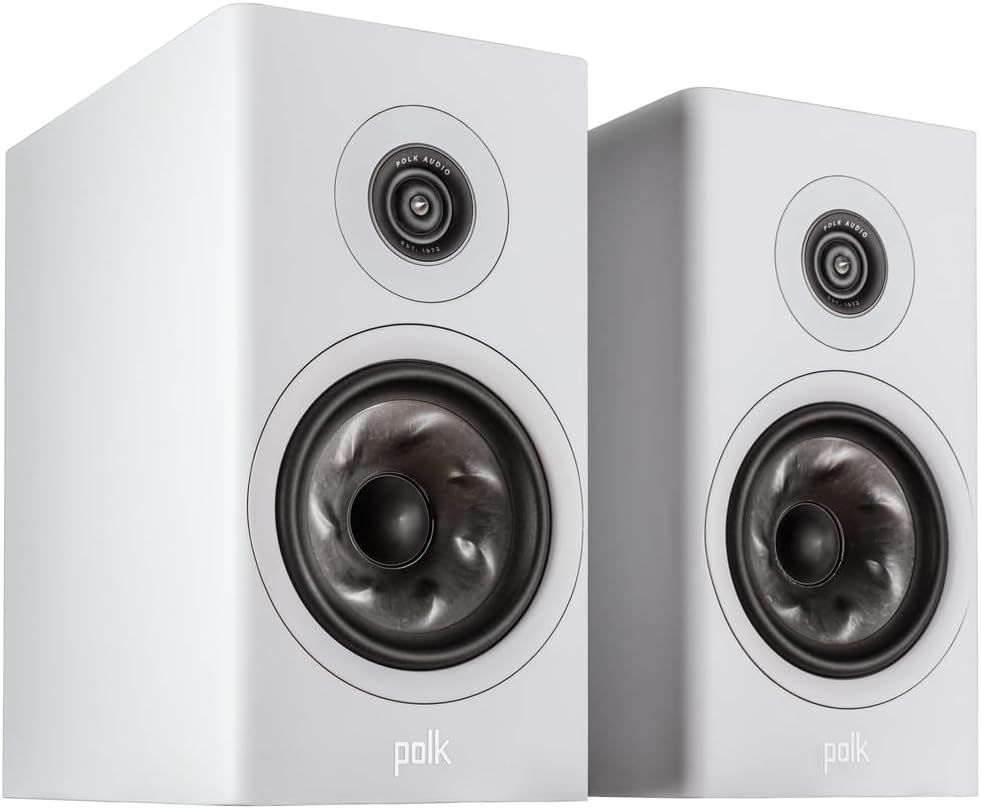
These speakers create the main stereo image and are crucial for wide, expansive sound. Their placement dictates the breadth and depth of your front soundstage.
- Ideal Placement: Forming an equilateral triangle with your primary listening position. They should be at roughly ear height. The distance between them should generally be similar to the distance from each speaker to your ears.
- Toe-in: Experiment with “toeing-in” the speakers – angling them slightly towards the listening position. This can help focus the sound and improve imaging.
- Distance from Walls: Avoid placing them flush against the wall, as this can cause boomy bass. Experiment with pulling them out a foot or two to see how it affects the sound.
3. Surround Speakers: Enveloping You in the Action
Surround speakers are responsible for those subtle environmental sounds and on-screen action that moves behind you.
- Ideal Placement: Slightly behind and to the sides of your listening position, typically 90-110 degrees from the center channel. They should also be at or slightly above ear level.
- Example: Imagine sitting in your sweet spot. Your front left speaker is at 0 degrees, your center at 0 degrees, and your surround left speaker would be somewhere to your left and slightly behind.
- Why it Matters: Proper surround placement creates a seamless audio bubble, drawing you into the movie’s environment.
4. The Height Channels: The Crucial Dimension of Atmos
This is where the Dolby Atmos magic happens. The placement of your Polk Atmos height modules or dedicated ceiling speakers is paramount.
4.1. Dedicated In-Ceiling or On-Ceiling Speakers: The Pinnacle of Accuracy
If you’ve invested in dedicated ceiling speakers, precise placement is key for the most convincing overhead effects.
- Dolby’s Recommendations: Dolby provides guidelines for ideal placement based on the number of height channels. For a 5.1.2 system (5 surround, 1 subwoofer, 2 height), Dolby recommends placing the two height speakers directly above and slightly forward of the main listening position. For a 7.1.4 system (7 surround, 1 subwoofer, 4 height), you’ll have front and rear height channels.
- Visualizing the Overhead Sound: Think of the sounds as originating from specific points in the sky. A rain effect should sound like it’s directly overhead, while a helicopter will have a more dynamic, moving trajectory.
- Case Study: A homeowner installing a 7.1.4 Polk Atmos system found that placing their in-ceiling speakers in the Dolby-recommended positions for front and rear heights created a dramatic improvement in the overhead effects. Birds chirping from above and the roar of a jet passing overhead felt incredibly realistic.
4.2. Polk Up-Firing Atmos Modules: Leveraging Your Ceiling
For those using Polk’s up-firing modules, your ceiling becomes your sonic canvas. While less precise than in-ceiling speakers, they can still deliver impressive results.
- Placement on Tower/Bookshelf Speakers: These modules are designed to sit directly on top of your front left/right and/or rear surround speakers. Ensure they are securely placed and facing upwards.
- Ceiling Height: The ideal ceiling height for up-firing modules is typically between 8 and 12 feet. Too low a ceiling can result in a compressed soundstage, while too high a ceiling can lead to diffusion and a loss of direct overhead cues.
- Ceiling Material: A hard, reflective ceiling (like plaster or drywall) is best. Soft, absorbent ceilings (like acoustic tiles) will significantly diminish the effectiveness of up-firing modules.
- Example: A reviewer testing Polk’s XT90 up-firing modules found that in a room with a standard 9-foot drywall ceiling, they successfully created a sense of rain falling from above and the whoosh of passing cars. However, in a room with cathedral ceilings, the effect was less pronounced.
- Experimentation: Don’t be afraid to experiment with slight adjustments to the angle of the up-firing module if your speakers allow. Small tweaks can sometimes optimize the reflection.
Calibration: Fine-Tuning for Perfection

Once your Polk Atmos speakers are physically in place, calibration is the essential next step to ensure they blend seamlessly and deliver the intended sonic experience.
1. The Role of Your AV Receiver (AVR)
Your AV receiver is the brain of your home theater system. It interprets the Dolby Atmos signal and sends the appropriate audio information to each speaker. Most modern AVRs have built-in calibration systems.
- Automatic Calibration Systems: Systems like Audyssey (found on Denon and Marantz receivers), YPAO (Yamaha), and MCACC (Pioneer) use a microphone to measure the acoustics of your room and the output of each speaker. They then adjust volume levels, speaker distances, and equalization (EQ) to compensate for room anomalies and ensure a balanced sound.
- Follow the On-Screen Prompts: Connect the included calibration microphone to your AVR and place it at your primary listening position. Follow the on-screen instructions meticulously.
- Run Multiple Measurement Points: For the best results, run the calibration routine with the microphone placed at several positions around your main listening area, not just the single sweet spot.
2. Manual Adjustments: When to Trust Your Ears
While automatic calibration is powerful, there are times when manual adjustments can further enhance the performance.
- Crossover Frequencies: This setting determines where the bass frequencies are routed to your subwoofer versus your main speakers. For Polk’s smaller bookshelf or satellite speakers, you’ll likely need higher crossover settings (e.g., 80Hz or higher). For larger tower speakers with significant bass capabilities, you might set the crossover lower. Consult your Polk speaker manual for recommended crossover settings.
- Speaker Levels: After calibration, do a quick listening test with familiar movie scenes. If certain speakers sound too loud or too quiet, you can make minor adjustments to their individual channel levels in your AVR settings.
- Distance Settings: Ensure the distance settings for each speaker in your AVR accurately reflect their physical placement from your listening position. This is crucial for proper timing and the creation of a cohesive soundstage.
3. The “Sweet Spot” and Beyond: Accommodating Your Room
While the “sweet spot” is the ideal listening position, a well-calibrated Atmos system should offer a good experience in a wider area of your room.
- Room Acoustics: Hard, reflective surfaces can cause echoes and sound degradation. Consider using acoustic treatments like rugs, curtains, and bass traps to tame excessive reflections.
- Speaker-Room Interaction: Even with calibration, the interaction between your speakers and the room’s dimensions can create “room modes” – areas where certain bass frequencies are boosted or diminished. This is a more advanced topic, but be aware that significant bass issues might require acoustic treatment.
Essential Accessories for Polk Atmos Excellence

Beyond the speakers and AVR, a few key accessories can elevate your Polk Atmos experience:
- High-Quality Cables: While overkill isn’t necessary, using decent-gauge speaker wire and HDMI cables ensures a clean signal path.
- Sturdy Speaker Stands: For bookshelf speakers, proper stands are essential to position them at the correct height and decouple them from surfaces that can cause vibrations.
- Subwoofer Placement: The subwoofer is not just for explosions; it adds weight and depth to the entire sound spectrum. Experiment with different subwoofer placements in your room, as bass frequencies are highly affected by room acoustics. A common technique is the “subwoofer crawl.”
Troubleshooting Common Polk Atmos Issues

Even with meticulous setup, you might encounter occasional hiccups. Here are a few common issues and their solutions:
- No Overhead Effects:
- Ensure your AVR is set to output Dolby Atmos.
- Verify your source material (streaming service, Blu-ray disc) supports Dolby Atmos.
- Check that your height speakers are correctly wired and enabled in your AVR’s speaker configuration.
- For up-firing modules, ensure they are properly positioned and your ceiling is suitable.
- Dialogue is Unclear:
- Re-center your center channel speaker.
- Ensure its level is properly set in your AVR.
- Check for any obstructions in front of the center channel.
- Sound is Tinny or Harsh:
- Run your AVR’s calibration again.
- Adjust the EQ settings on your AVR.
- Consider acoustic treatments for your room.
Setting up your Polk Atmos speakers for optimal performance is a rewarding endeavor. By understanding the principles of Dolby Atmos, meticulously planning your speaker placement, and diligently calibrating your system, you can transform your home theater into a true sonic sanctuary. Remember that each room is unique, and a degree of experimentation and fine-tuning will always yield the best results. With Polk’s commitment to audio excellence and these comprehensive guidelines, you are well on your way to experiencing movies, music, and games with an unprecedented level of depth, detail, and immersion.