In the ever-evolving landscape of technology, connectors play a pivotal role in facilitating the seamless flow of data and power. Among the most ubiquitous connectors are those belonging to the Universal Serial Bus (USB) family. While the term “USB” itself evokes familiarity, the specific types – particularly Type-A and Type-B – often lead to confusion. This comprehensive guide aims to demystify these two fundamental USB connectors, exploring their history, design, applications, and the nuances that set them apart.
The Genesis of USB: A Revolution in Connectivity

Before delving into the specifics of Type-A and Type-B, it’s crucial to understand the revolutionary impact of USB technology itself. Introduced in the mid-1990s, USB was designed to standardize the connection of peripherals to computers, replacing a multitude of proprietary and often cumbersome interfaces like serial and parallel ports. The initial goals were ambitious:;
- Simplicity: Easy plug-and-play functionality, eliminating the need for complex configuration.
- Universality: A single standard for a wide range of devices, from keyboards and mice to printers and external hard drives.
- Speed: Faster data transfer rates compared to previous interfaces.
- Power Delivery: The ability to power devices directly from the host computer.
The early iterations of USB, such as USB 1.0 and 1.1, paved the way for subsequent advancements, leading to USB 2.0, USB 3.0 (now often referred to as USB 3.2 Gen 1), USB 3.1 (USB 3.2 Gen 2), and the latest USB 3.2 standards, each offering significant improvements in speed and functionality.
USB Type-A: The Ubiquitous Host Connector

When most people think of a USB port, they are likely picturing a USB Type-A connector. This distinctive rectangular port is the de facto standard for host devices, meaning it’s the connector found on computers, laptops, gaming consoles, smart TVs, and power adapters that initiate the data transfer or power supply.
Design and Characteristics of Type-A
The USB Type-A connector is characterized by its:
- Shape: A flat, rectangular metallic slot.
- Orientation: It has a distinct “correct” way of being inserted, often requiring a bit of finessing to align properly. This can be a common source of user frustration.
- Purpose: Primarily serves as the upstream connector (the port on the host device).
- Versions: While the physical connector remains largely the same, Type-A ports can support various USB specifications (e.g., USB 2.0, USB 3.0, USB 3.1, USB 3.2), influencing their data transfer speeds and power delivery capabilities. You can often distinguish between USB 2.0 and USB 3.x Type-A ports by the color of the internal plastic – typically black for USB 2.0 and blue for USB 3.0/3.1/3.2.
Common Applications of Type-A
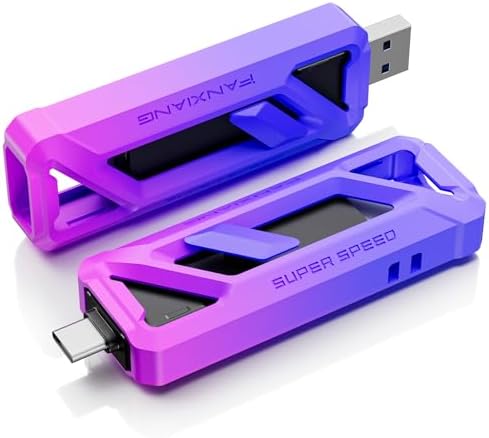
USB Type-A is found in an astonishing array of devices and applications:
- Computers and Laptops: The most common port for connecting peripherals.
- Keyboards and Mice: Nearly all wired keyboards and mice utilize Type-A connectors.
- Printers and Scanners: Standard connection for these peripherals.
- External Hard Drives and SSDs: For data storage and transfer.
- USB Flash Drives (Thumb Drives): The iconic portable storage device.
- Webcams: Connecting cameras to computers.
- Charging Cables: The end that plugs into a power adapter or a computer for charging.
- Gaming Controllers: For wired gaming input.
- Smart TVs and Media Players: For connecting external storage or accessories.
The sheer ubiquity of Type-A has made it a cornerstone of modern computing and entertainment systems. Its backward compatibility with older USB standards further solidifies its position.
USB Type-B: The Peripheral’s Partner

In contrast to the host-centric Type-A, USB Type-B connectors are typically found on peripheral devices – the devices that connect to a host. While less commonly seen by end-users than Type-A, Type-B connectors have played a crucial role in connecting a variety of larger peripherals.
The Evolution and Varieties of Type-B
The Type-B connector has seen several iterations, primarily driven by the need to accommodate higher data transfer speeds and different device form factors. The most common versions include:
Standard USB Type-B
This is the original, larger Type-B connector. It’s characterized by its square shape with beveled corners, making it distinct from Type-A.
- Design: Square with chamfered corners, often metallic.
- Purpose: Designed for larger peripheral devices that required a more robust connection and potentially higher power draw.
- Applications:
- Printers
- Scanners
- External hard drive enclosures (older models)
- Some audio interfaces
This version is less common in newer devices, having been largely superseded by smaller and more versatile USB connectors.
Mini-USB Type-B
As devices became smaller, a more compact version of the Type-B connector was needed. Mini-USB filled this gap.
- Design: Smaller and trapezoidal in shape.
- Purpose: To enable USB connectivity in more compact portable devices.
- Applications:
- Digital cameras (older models)
- MP3 players (older models)
- Some GPS devices
- External hard drives (some older portable models)
While once prevalent, Mini-USB has also largely been replaced by Micro-USB and USB-C.
Micro-USB Type-B
This is the most widely recognized and previously dominant Type-B connector for portable electronics. It’s significantly smaller than both the standard and Mini-USB connectors.
- Design: Very small and flat, trapezoidal shape.
- Purpose: Ideal for the increasingly miniaturized world of smartphones, tablets, and other mobile devices.
- Applications:
- Smartphones (Android devices primarily, before USB-C)
- Tablets
- E-readers
- Bluetooth headphones and speakers
- Power banks
- Many portable gaming devices
Micro-USB offered a good balance of size and functionality for its time. However, its limitations in terms of speed and power delivery, along with its reversible insertion challenge, have led to its decline in favor of USB-C.
The “Host” vs. “Device” Distinction
A fundamental concept to grasp when understanding Type-A and Type-B is the “host” versus “device” paradigm.
- Host: The controlling device that initiates communication. Typically a computer, laptop, or game console. USB Type-A ports are almost always the host ports.
- Device: The peripheral that connects to the host to perform a function. Keyboards, mice, printers, external drives, and smartphones are examples of devices. USB Type-B connectors (in their various forms) are typically found on these devices.
This distinction is crucial because USB cables have different connectors on each end to facilitate this communication. A standard USB cable, for instance, will have a Type-A connector on one end (to plug into the host) and a Type-B connector (or one of its variants) on the other end (to plug into the peripheral).
Beyond Type-A and Type-B: The Rise of USB-C
While Type-A and Type-B have been the workhorses of USB for decades, the technological landscape is shifting. The advent of USB Type-C marks a significant departure and represents the future of USB connectivity.
Key Advantages of USB Type-C
- Reversible Connector: Perhaps the most celebrated feature, USB-C can be plugged in either way, eliminating the frustration of fumbling with orientation.
- Higher Speeds: USB-C is designed to support the latest USB specifications, including USB 3.2 and Thunderbolt, offering significantly faster data transfer rates (up to 40 Gbps and beyond).
- Increased Power Delivery: It supports USB Power Delivery (USB PD), allowing for much higher wattage charging for laptops, smartphones, and other power-hungry devices.
- Versatility: USB-C can carry various types of data and signals, including DisplayPort, HDMI, and Thunderbolt, making it a true all-in-one connector.
- Smaller Form Factor: It’s roughly the same size as Micro-USB, allowing for sleeker device designs.
The gradual adoption of USB-C by major manufacturers, especially in smartphones and laptops, indicates its dominance in the coming years. While older devices will continue to rely on Type-A and Type-B, new product releases are increasingly featuring USB-C ports.
Case Study: The Printer Dilemma

Consider the common scenario of setting up a new printer. Historically, you would connect the printer to your computer using a USB Type-A to USB Type-B cable. The Type-A end plugs into a port on your computer, and the Type-B end plugs into the port on the printer. This setup has been reliable for years.
However, with the advent of newer printers and more modern computers (especially laptops with limited Type-A ports), you might encounter printers with a USB-C port. In such cases, you would need a USB-C to USB-C cable if your computer also has a USB-C port, or potentially a USB-A to USB-C cable if your computer only has older USB ports.
This illustrates the ongoing transition and the need to be aware of the different connector types and their compatibility.
Statistics on USB Adoption

While precise, up-to-the-minute statistics for specific connector types can be elusive, the overall growth of USB technology is undeniable. Market research reports consistently show a massive global market for USB connectors and cables, driven by the proliferation of connected devices. For instance:
- The global USB connector market is projected to grow significantly in the coming years, fueled by the increasing demand for consumer electronics, automotive applications, and industrial automation.
- The adoption of USB-C is rapidly increasing, with a large percentage of new smartphones and laptops already featuring this connector.
This sustained growth highlights the enduring importance of USB technology, even as newer standards emerge.
Navigating the USB Landscape
USB Type-A and Type-B, in their various forms, have been instrumental in shaping the modern digital experience. Type-A remains the ubiquitous host connector, found on virtually all computers and devices that initiate data transfer or provide power. Type-B, with its standard, Mini, and Micro variants, has served as the peripheral connector for a wide range of devices, from large printers to small smartphones.
Understanding the fundamental difference between host and device ports is key to comprehending their roles. While these connectors have served us well, the future is undoubtedly leaning towards the versatile, reversible, and high-performance USB Type-C. As technology continues to advance, staying informed about the evolution of USB connectors will ensure seamless connectivity and optimal device performance in our increasingly interconnected world.